
Alamo - Car Rental
EAN Services, LLCTravel & Local
4.71.64K Reviews
- Version
- 7.19.0.6358
- Installs
- 500.00K
- Age Rating
- Everyone
Screenshots
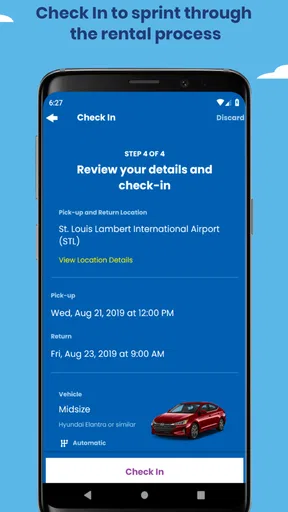
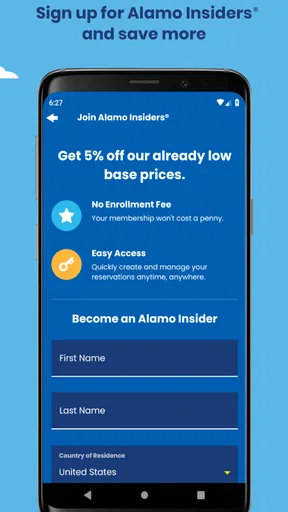
Our Review of Alamo - Car Rental
 Analysis by Appyee
I found Alamo - Car Rental most useful when I treated it as a focused planning tool rather than a complete travel companion. It is a free Travel & Local app from EAN Services, LLC, built around finding rental-car deals and organizing the early steps of a booking. After using it for the kind of trip where I need a vehicle at an unfamiliar airport or in a city with limited public transport, I came away with a clear impression: it can make the search less tiring, but it still rewards careful checking before you commit.
The app suits people who already know roughly where and when they need a car. It is less helpful if you are still deciding between trains, taxis, rideshare services, and a rental. That distinction matters. A rental search can show an attractive starting option, yet the real decision depends on pickup convenience, vehicle size, timing, and the terms attached to the reservation. I would use Alamo as a practical first stop, then compare the result with the total travel plan rather than assuming the cheapest visible choice is automatically the best one.
Starting with a clean rental-search routine
I start with a small amount of preparation because rental searches can go sideways when I enter dates or pickup details in a hurry. In this section, I’ll explain how I keep the first search grounded in the actual trip, then look at the habits that make later checks easier.
Enter the trip in a way that keeps the results useful
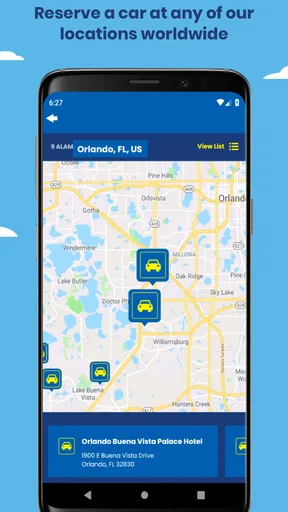
My preferred workflow begins before opening the search screen. I decide whether the vehicle is needed for the whole trip or only for a particular part of it. If I am staying downtown for several days, collecting a car immediately may create unnecessary driving and parking complications. If I am heading straight from an airport to several locations, an airport pickup may be more sensible even if the surrounding costs deserve a closer look.
Once that decision is made, I enter the pickup location and dates carefully, then pause to review them before moving on. Rental searches are unusually sensitive to small mistakes. A late-night arrival, an early return, or a pickup at the wrong branch can change whether the result is practical. I do not rush through the first screen just because the app makes the search feel quick. The quality of the choices depends heavily on the accuracy of the starting details.
One habit that saves me trouble is searching the exact plan first and only then testing a nearby alternative. For example, I might compare an airport branch with a city location on the same dates, but I keep the original search visible in my notes so I do not confuse a lower-looking amount with a genuinely better arrangement. This is especially useful when travel times make one branch much harder to reach.
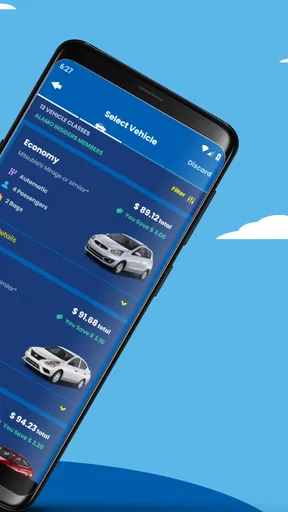
The app is best viewed as a way to narrow the field. It helps me get to the relevant rental choices without making me browse an entire travel website. I still read the vehicle description, pickup information, and booking conditions as separate parts of the decision. A compact car that looks ideal on a phone screen may be a poor match for several passengers and large luggage, while a larger vehicle can introduce its own cost and parking drawbacks.
Why the first result should not end the search
When I use a rental app, I am not only asking, “What is the price?” I am asking whether the car fits the trip. The pickup point, the length of the rental, the number of travelers, and the amount of luggage all matter. Alamo - Car Rental gives me a convenient starting place, but it does not remove the need for that judgment.
I also avoid comparing results from different searches unless I write down what changed. Changing the return location, even unintentionally, can make two options look comparable when they are not. The same applies to different dates or times. My simple method is to change one detail at a time, revisit the result, and record which choice produced the improvement. It is slower than tapping randomly, but much faster than rebuilding a reservation after discovering the mismatch.
For a normal weekend away, this workflow is usually enough. For a longer road trip, I spend more time checking whether the vehicle category and branch location make sense for the route. The app is convenient at the discovery stage, while the final decision still belongs to the traveler.
What I check before treating a deal as a deal
I pay attention to the wording around the vehicle rather than relying on a photograph or a broad category name. A rental category is not the same as a guaranteed make and model, so I plan around the category’s practical needs: luggage space, passenger comfort, and driving conditions. That mindset prevents a common mistake—choosing the smallest option for a trip where the people and bags clearly require more room.
I also inspect the timing from a human perspective. A pickup that technically fits my arrival may be stressful if I have to collect luggage, find the counter, and navigate an unfamiliar terminal. Likewise, a return time that looks efficient on paper can be risky before an early flight. The app helps me search, but I use the displayed schedule as a prompt to think through the whole airport routine.
My rule is simple: a rental is only a good deal when the car, location, and timing work together. That rule sounds obvious, yet it is the most useful protection against being distracted by an appealing first result.
Settings and habits that make the app easier to use
A consistent routine helps me avoid changing several details at once and losing track of why one result looks better than another. I’ll focus next on practical phone-use habits and simple ways to keep the rental decision connected to the rest of the itinerary.
Keep the search focused instead of over-customizing it
I do not approach this app as a place that needs endless configuration. Its value comes from getting the core search right. I check the location, pickup and return timing, and the selected vehicle requirements before I worry about anything else. If the app presents account or reservation-related choices during the process, I review them deliberately rather than accepting every prompt on autopilot.
That approach is helpful because travel apps can become cluttered when users try to solve every possible issue before they know what they need. I prefer a clean first search, followed by targeted adjustments. If the result is too expensive, I test a different branch or vehicle category. If it is inconvenient, I change the location. If it does not suit the route, I reconsider whether a rental is appropriate at all.
For repeat renters, consistency is more valuable than constant experimentation. I use the same order each time: location, dates, pickup and return details, vehicle suitability, and then the final review. A repeatable sequence reduces the chance that I overlook a changed date or accept the wrong branch simply because the screen looks familiar.
Use the phone as a checklist, not just a booking screen
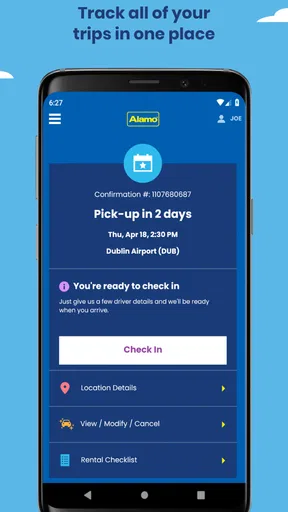
One of the more practical ways I use Alamo is alongside a simple travel note. I keep the pickup location, return location, reservation details, and the questions I still need to answer in one place. The app remains the source I use for the rental search, while the note prevents me from forgetting why I chose a particular option.
This is useful when comparing a rental with another form of transport. I write down the time saved by driving, the number of people sharing the vehicle, and whether parking will be a problem. A rental can be sensible for a family carrying equipment, but unnecessary for a solo traveler staying near reliable public transport. The app cannot make that personal calculation for me, and I would not want it to.
I also review the reservation from the perspective of the person who will actually collect the car. If I am booking for someone else, I make sure that traveler understands the location and timing. A beautifully organized search is still a poor result if the driver arrives without knowing where to go or discovers that the selected branch is inconvenient.
Where the app feels strongest on a phone
The mobile format works well when I am already traveling or making a decision away from a computer. I can search while discussing the itinerary with friends, revisit the options during a hotel-planning session, and keep the rental task separate from a crowded desktop browser. The free price also makes it easy to install for a single trip without treating it as a long-term commitment.
At the same time, a phone screen is not ideal for comparing many variations at once. I find it easier to make two or three deliberate searches than to keep switching between numerous possibilities. If I need a broad market comparison across several rental companies, a general travel marketplace or a desktop browser may be more comfortable. Alamo’s focused experience is a strength when I want its rental choices, but a limitation when I want a complete cross-company overview.
Useful shortcuts that come from preparation
The best shortcut is preparing the information before searching. I decide the realistic vehicle size, identify the most convenient pickup area, and know whether the return must be at the same place. This prevents the app from becoming a guessing game. It also makes the results easier to compare because I am evaluating options against a fixed need.
Another effective shortcut is to search the most likely plan first, then change only the variable that is causing trouble. If the price is high, I test timing or location. If the location is awkward, I test a nearby branch. If the car does not fit the group, I change the category. This one-variable method reveals the trade-off instead of hiding it inside a completely different search.
I would not call these hidden functions; they are disciplined ways of using the functions the app is designed to provide. The advantage comes from the habit, not from pretending the app can predict the perfect rental.
Limits that matter before you rely on it
A smooth search is only one part of arranging a car, so I keep the app’s role in perspective before depending on it for a trip. The next section looks at where a dedicated rental search helps, where broader transport comparisons are more useful, and which details still need a traveler’s attention.
A focused rental app is not a complete trip planner
The biggest limitation is also the clearest boundary: this is a car-rental app, not a full itinerary manager. It does not replace a map, a public-transport planner, or a broader travel marketplace in my routine. If I am deciding how to move around a dense city, I want information about trains, buses, walking, and rideshare services as well as cars.
That does not make Alamo - Car Rental weak. It simply means I use it at the right stage. For a road trip, a family visit, or a destination where a car is central to the plan, the focused approach is useful. For an urban break where I may drive only once, I usually compare the rental search with local transport before booking.
Search convenience does not remove rental complexity
Rental decisions involve details that are easy to skim on a small screen. I take extra care with pickup and return times, vehicle category, location, and the conditions shown during the reservation process. I do not assume that a low initial figure represents the entire practical cost of the trip. Fuel, parking, tolls, and the time needed to reach a branch can change the value of the choice even when the app itself makes the search straightforward.
This is also why I avoid booking while distracted. A quick tap during a busy airport transfer is exactly when I am most likely to miss a location or date difference. I prefer to search when I can read the result calmly, then reopen the details before finalizing anything.
Who should choose another approach
I would point a traveler toward a broader comparison service if they want to see many rental companies together or combine flights, hotels, and transport in one workflow. I would choose a local transit app for a city-centered trip where driving is optional. I would also avoid relying on a rental-first approach when the itinerary has uncertain dates and no clear need for a vehicle.
On the other hand, people who already know they want an Alamo rental may appreciate the directness here. Families can use it to compare practical vehicle categories, business travelers can search around a fixed schedule, and road-trippers can test pickup locations before committing to an itinerary. The app is most convincing when the rental is a central part of the journey rather than a last-minute add-on.
Compatibility, trust, and everyday expectations
The app is available for devices running Android 8.0 or later, and its current version is 7.19.0.6358. It is rated for Everyone, which makes it approachable for a broad audience, although the actual rental responsibility still belongs to the adult making the reservation and driving the vehicle.
Its public reception is strong: it carries a 4.7 average from around 6.1 thousand ratings, with roughly 1.6 thousand written reviews and over 500 thousand installs. I see those figures as useful signs that the app has found a regular audience, not as proof that every rental experience will be smooth. Branch conditions, travel schedules, and individual expectations can still shape the outcome.
My verdict after building a repeatable routine
For me, the most dependable outcome comes from treating the app as a focused tool and pairing it with a careful review of the plan. I’ll close by weighing who benefits from that approach and when I would choose a broader travel service or another way to get around.
What experienced use looks like
After using it as part of a repeatable travel routine, I think the app’s real strength is focus. I can open it with a clear need, search a realistic pickup plan, compare the practical vehicle choices, and return to the reservation details without starting from an overloaded travel dashboard. That makes it especially comfortable for people who prefer to arrange the car separately from flights and accommodation.
The most effective users will not simply accept the first attractive result. They will prepare the trip details, compare one variable at a time, check the branch against the itinerary, and think about luggage and passengers before deciding on a category. Those habits turn a basic search tool into a more dependable part of trip planning.
Who will get the most from it
I recommend it to travelers who need a rental car and want a direct mobile way to investigate their options. It is a good match for airport arrivals, regional road trips, family travel, and business visits with a firm schedule. The free installation makes it easy to try, while the straightforward category placement keeps the purpose clear.
I would be more cautious recommending it to someone who has not decided whether renting is sensible. That person needs a transport comparison first, not only a car search. I would also suggest a larger screen or a broader travel service when the trip involves many companies, several destinations, or a complicated combination of transport arrangements.
The final balance
Alamo - Car Rental is best when you want a focused starting point and are willing to make the final judgment yourself. It simplifies the search without pretending that vehicle choice, timing, and pickup logistics are unimportant. I like that balance. The app saves me browsing time, but it does not encourage me to stop thinking about the trip.
For my own travel planning, I would keep it installed when a rental is likely, use it to test the exact itinerary, and then verify that the selected car and branch fit the people, bags, schedule, and wider transport plan. That is the habit that makes the experience worthwhile. As a free app from EAN Services, LLC, it earns a place in the toolkit of a traveler who wants a car-search workflow, while anyone seeking an all-in-one travel planner should look elsewhere.
Verdict
Strengths of Alamo - Car Rental
- Wide selection of vehicles for different trip types and budgets.
- Convenient airport and neighborhood pickup locations.
- Mobile booking makes reservations quick and easy to manage.
- Frequent promotions can reduce the total rental cost.
- Optional add-ons include GPS, child seats, and additional drivers.
Limitations of Alamo - Car Rental
- Additional fees may increase the final price beyond the initial quote.
- Some locations have limited vehicle availability during busy periods.
- Insurance choices can be confusing and significantly raise the cost.
- Customer support quality may vary between rental branches.
- Strict fuel, mileage, and return policies can lead to extra charges.
Other Releases by EAN Services, LLC
View All
Enterprise Car Rental
Travel & Local4.5

National Car Rental
Travel & Local4.4
Similar Picks in This Category
View All
Google Maps
Google LLC3.4

Google Maps Go
Google LLC4.1

Booking.com: Hotels & Travel
Booking.com Hotels & Vacation Rentals4.8

Google Earth
Google LLC3.8

Skyscanner Flights Hotels Cars
Skyscanner Ltd4.8

trivago: Compare hotel prices
trivago N.V.4.4
Frequently Asked Questions
What is Alamo - Car Rental, and what can I do with the app?
Alamo - Car Rental is the official mobile app for searching, booking, and managing Alamo vehicle rentals. After installing it, you can enter your pickup location, dates, and vehicle preferences to compare available cars, review rental details, and make a reservation. The app also lets you access booking information, check rental requirements, and manage or review upcoming trips from your phone.
Can I use the Alamo app to pick up and return a rental car?
Yes, the app is designed to support the rental process before and during your trip, although the exact pickup and return features may depend on the location and vehicle selected. You can use it to review your reservation, confirm the branch address and opening hours, and check the instructions provided for your rental. Some locations may offer faster or contactless options, but availability is not universal.
What documents and requirements do I need to rent a car through Alamo?
Requirements can vary by country, rental location, vehicle category, and customer profile, so you should carefully read the terms shown during booking. In general, renters need a valid driver’s license, an accepted payment card, and an identification document such as a passport when required. Age restrictions, additional-driver rules, deposits, insurance choices, and international license requirements may also apply.
Does the Alamo app show the final rental price, including taxes and fees?
The app displays pricing and rental conditions during the reservation process, but the total amount can depend on selected protection products, optional equipment, additional drivers, fuel policies, local taxes, and other charges. Before confirming, review the price breakdown, cancellation conditions, mileage policy, and payment details. The amount shown may also differ if you modify dates, location, vehicle type, or rental options.
Can I cancel or change an Alamo reservation from the app?
In many cases, you can retrieve and manage an existing reservation through the app, including reviewing details and making eligible changes. However, modification and cancellation rules depend on the reservation type, payment method, pickup location, rate conditions, and how close you are to the rental date. Check the specific terms attached to your booking, since prepaid reservations or special offers may have different restrictions or fees.
